Generate Test Cases from Requirements with AI Agents
An AI agent can read your requirement documents and draft the test cases your QA team would otherwise write by hand. Every test points back to the requirement it checks, so you can see coverage at a glance. Its most valuable output is often the list of gaps and contradictions it finds in the requirements themselves.
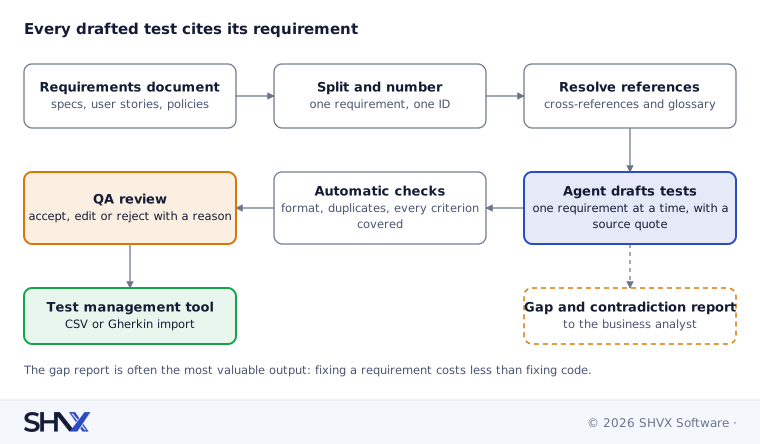
The short answer: don’t paste a requirements document into a chat and ask for “test cases”. Split the document into individual requirements with IDs, link their cross-references, then have the agent generate tests for one requirement at a time, each citing the requirement and acceptance criterion it covers. Build a traceability matrix from those citations, flag requirements with no tests or unclear wording, and have QA leads review every test before it enters the suite.
This post is about agents that do testing. It is different from our earlier guide, How to Test AI Agents, which is about testing the agents themselves. Both sit in our Agent Assurance work.
Why generate test cases with AI?
Writing test cases from a long requirements document is slow, repetitive and easy to get wrong. Testers read the same document many times, copy requirement IDs by hand, and still miss edge cases. Late in a project, nobody can say for sure which requirements have been tested.
An agent helps in three ways:
- Speed. It drafts the obvious positive, negative and boundary tests in minutes, so testers spend their time on the hard ones.
- Traceability. Every test is born with a link to its requirement, so coverage is a report, not a guess.
- Early warning. While reading, it notices requirements that are vague, untestable or in conflict with each other, before a line of code is written.
Step 1: Read the requirements properly
Requirements arrive as specifications, user stories with acceptance criteria, policy documents, regulatory clauses or a mix. Treat them like any large document:
- Split into atomic requirements. One requirement, one ID. If the source has no IDs, generate stable ones from the section structure (for example, REQ-4.2.3).
- Keep acceptance criteria attached. They are the most testable part of a user story.
- Resolve cross-references. “As defined in Section 2” or “subject to the limits in Appendix B” must be pulled in, or the agent will guess. Our post How to Extract Data from Large, Complex Documents with AI explains how to build these context packets.
- Pull in glossaries and business rules. A test for “a premium customer” is meaningless without the definition of premium.
Step 2: Generate test cases with a citation to each requirement
Give the agent one requirement at a time, with its context packet, and a fixed output format. A good test case record has:
| Field | Example |
|---|---|
| Test ID | TC-4.2.3-02 |
| Requirement ID and criterion | REQ-4.2.3, criterion 2 |
| Type | Positive, negative, boundary or security |
| Preconditions | Customer logged in, account active |
| Steps | Numbered actions |
| Expected result | What the system must do, quoted from the requirement where possible |
| Source quote | The exact sentence the test is based on |
Ask for the source quote every time. It lets reviewers check the test in seconds and stops the agent inventing behaviour the requirement never asked for. Where your team uses Given-When-Then (Gherkin) format, have the agent write in it so tests can feed automation directly.
Step 3: Build the traceability matrix
Because every test cites its requirement, the traceability matrix builds itself. Each row is a requirement; the columns show its tests, their types and their latest results.
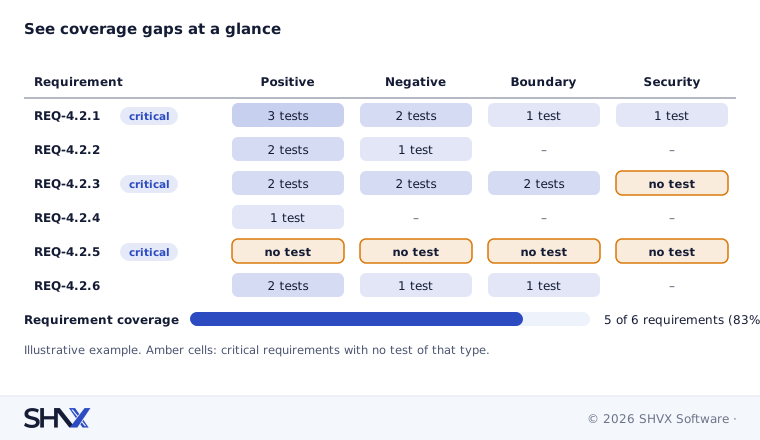
The matrix answers the questions a release manager or auditor actually asks: which requirements have no tests, which have only happy-path tests, and which tests failed in the last run.
Step 4: Find gaps and contradictions
This is where an agent often pays for itself. Ask it to flag, with the source quote:
- Vague words that can’t be tested: “fast”, “user-friendly”, “where appropriate”.
- Missing behaviour: what happens on error, timeout, empty input or a duplicate request?
- Contradictions: two requirements that set different limits, deadlines or permissions for the same case.
- Orphans: acceptance criteria with no matching requirement, or requirements with no acceptance criteria.
Send this report to the business analyst or product owner. Fixing a requirement costs far less than fixing the code built on it.
Step 5: Keep a person in charge
AI-drafted tests are drafts. QA leads should review every test before it enters the suite, at least until accuracy is proven. Make review fast: show the requirement quote next to the test, and let reviewers accept, edit or reject in one click. Record every rejection with a reason. Those reasons are your best guide to improving prompts and context.
How to measure it
- Requirement coverage: share of requirements with at least one accepted test.
- Criterion coverage: share of acceptance criteria covered.
- Acceptance rate: share of drafted tests accepted with no or minor edits.
- Duplicate rate: tests that check the same thing twice.
- Defects found: defects caught by agent-drafted tests, compared with hand-written ones.
Run the agent on a past project where you already have human-written tests and known defects. That gives you a fair baseline before you trust it on a live one.
Common mistakes
- Pasting the whole document into one prompt.
- Accepting tests without a source quote.
- Ignoring the gap report because it is “not QA’s job”.
- Measuring the number of tests instead of coverage and defects found.
- Skipping human review to save time.
How SHVX can help
QA team buried in requirement documents? Send one requirements document. We’ll return a sample traceability matrix and a list of the gaps we found.
Learn more about Agent Assurance.
FAQ
Can AI write all our test cases?
It can draft most routine ones. Complex scenarios, exploratory testing and final judgement stay with your testers.
What is a traceability matrix?
A table that links each requirement to the tests that check it, so you can see what is covered and what is not.
Will the tests work with our test management tool?
Usually, yes. Ask the agent for a fixed format such as CSV or Gherkin, then import.
How is this different from testing AI agents?
Here the agent helps test your software. Testing AI agents is about checking the agent itself.