Bank Statement Analysis with AI: Extraction and Checks
Credit teams spend hours turning bank statements into monthly figures by hand. An AI pipeline can extract every transaction, categorise it and check it against the borrower’s accounts, with a link to the source page on every line. Analysts then review the flags instead of retyping the statements.
The short answer: read each statement as a table, not as text. Detect the bank and layout, extract every row with its page number, and prove the extraction is complete by recomputing the running balance line by line. Then categorise transactions with rules first and a model for the rest, build monthly summaries, compare them with the financial statements, and flag gaps and unusual entries for a person to review.
This is the technical companion to AI Loan Processing, and it uses the same approach as our Agent-Ready Data work: structure first, then extraction, then checks.
Why are bank statements hard to extract?
- Every bank has its own layout, and many change it every few years.
- Some are digital PDFs, some are scans or phone photos. Digital PDFs have a text layer; scans need OCR first.
- Tables break across pages, with headers repeated, totals carried forward and rows split in two.
- Descriptions wrap over several lines and are full of codes, reference numbers and truncated names.
- Amounts are shown differently: separate debit and credit columns, or one column with Dr and Cr markers, or negative numbers.
- Dates come in many formats, and value date and posting date are not always the same.
- Password-protected files are common and must be handled securely.
Step 1: Detect the bank and the layout
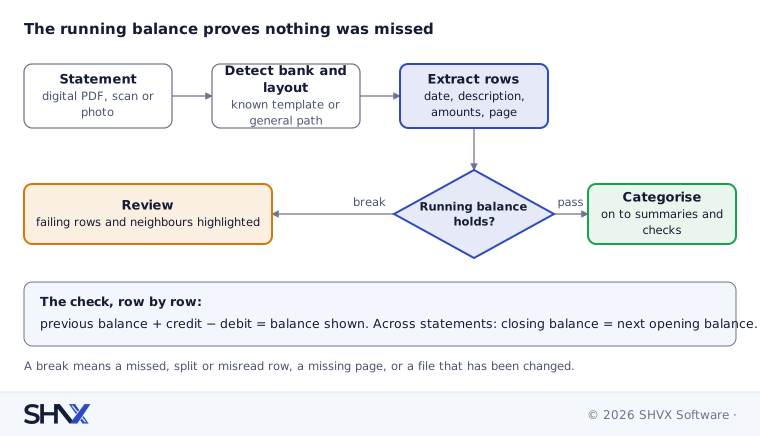
Identify the bank, the statement type and the layout version from the header, logo area and column names. A known layout lets you use a tested extraction template. An unknown one goes to a general table-extraction path and gets lower starting confidence.
Step 2: Extract every row, with its page
Use layout-aware table extraction for digital PDFs and OCR plus table detection for scans. For each row, keep: date, description (merged across wrapped lines), debit, credit, balance, page number and row position. Drop repeated headers and carried-forward lines, but log them.
Step 3: Prove the extraction is complete
Bank statements have a built-in check that most documents lack: the running balance. For every row, opening balance plus credits minus debits must equal the closing balance shown.
- If every row reconciles, the extraction is very likely complete and correct.
- If a row breaks the chain, a row was missed, split or misread. Flag that row and its neighbours for review.
- Across statements, the closing balance of one period must equal the opening balance of the next. A mismatch means a missing statement or a missing page.
This single rule catches most extraction errors before anyone looks at the data, and gives each statement an honest confidence score.
Step 4: Categorise transactions
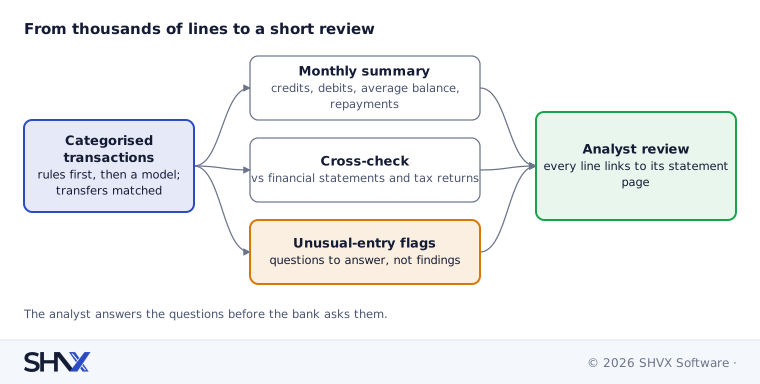
Categorisation turns thousands of lines into numbers an analyst can use. Do it in layers:
- Clean the description. Strip reference numbers and codes, and normalise the counterparty name, so “ABC TRADERS PVT” and “ABC TRADERS PRIV” become one counterparty.
- Apply rules first. Loan repayments, salaries, tax payments, card settlements, cash deposits and bounced payments usually follow clear patterns. Rules are fast, cheap and easy to explain.
- Use a model for the rest. A language model assigns categories to what the rules don’t catch, with a confidence score and a short reason.
- Find internal transfers. When a borrower has several accounts, money moving between them is not income. Match equal amounts on close dates across accounts.
Keep your category list short and agreed with the credit team. A list nobody uses is worse than a short list everybody trusts.
Step 5: Build summaries and cross-check
From categorised transactions, build monthly figures: total credits, business credits (excluding transfers and loan proceeds), debits, average balance, loan repayments and bounced payments.
Then cross-check against the financial statements and tax returns:
| Check | What it catches |
|---|---|
| Annual business credits vs reported turnover | Turnover that never passed through the bank, or bank credits not in the accounts |
| Loan repayments vs declared borrowings | Undisclosed loans |
| Months with no statement | Gaps in the period the bank asked for |
| Balance breaks between statements | Missing pages or edited files |
Differences are not automatically problems. They are questions an analyst should answer before the bank asks them.
Step 6: Flag unusual entries
Flag, with evidence, for a person to review:
- large round-number credits just before the statement period ends;
- money that comes in and goes out the same day to the same counterparty;
- many cash deposits just below reporting limits;
- bounced payments and penalty charges;
- rows where the balance chain breaks, or fonts and spacing look different from the rest of the page.
These are signals worth a look, not proof of anything. Treat them as review triggers, and record the reviewer’s conclusion.
Confidence scores and page citations
Give every statement, row and category a confidence score built from the balance check, the layout match and the model’s own certainty. Store the page and row position for every transaction. When an analyst or a bank asks “where does this number come from?”, the answer is one click away.
How to measure it
Build a golden set of real statements across your common banks and your worst scans, with hand-checked transactions. Track:
- row completeness: share of statements whose balance chain fully reconciles;
- field accuracy: dates and amounts exactly right;
- category accuracy: against the credit team’s labels;
- review rate: share of statements needing a person.
Re-run it every time you add a bank layout or change a prompt. Our post How to Test AI Agents explains how to make that automatic.
Common mistakes
- Extracting text instead of tables.
- Skipping the running-balance check.
- Counting transfers between the borrower’s own accounts as income.
- Letting a model categorise everything when simple rules would do.
- Treating flags as fraud findings rather than questions.
How SHVX can help
Credit team still reading statements line by line? Send a few statement formats you deal with. We’ll run a sample extraction and show you the balance checks and categories.
Learn more about Agent-Ready Data.
FAQ
Can AI read scanned bank statements?
Yes, with OCR and table detection, though accuracy is lower than for digital PDFs. The running-balance check shows which scans need review.
How do you know no transactions were missed?
Recompute the balance after every row. If the chain holds from opening to closing balance, nothing is missing.
Can it detect fraud?
It can flag patterns worth a closer look. Deciding whether something is fraud stays with trained people.
Do we need a template for every bank?
Templates make common banks fast and accurate. A general extraction path covers the rest, with more review.