How to Extract Data from Handwritten Forms with AI
Handwritten forms can now be read by AI with useful accuracy, but never perfectly. The trick is to measure confidence for every single field and send only the unsure ones to a person. That turns a full retyping job into a short review job.
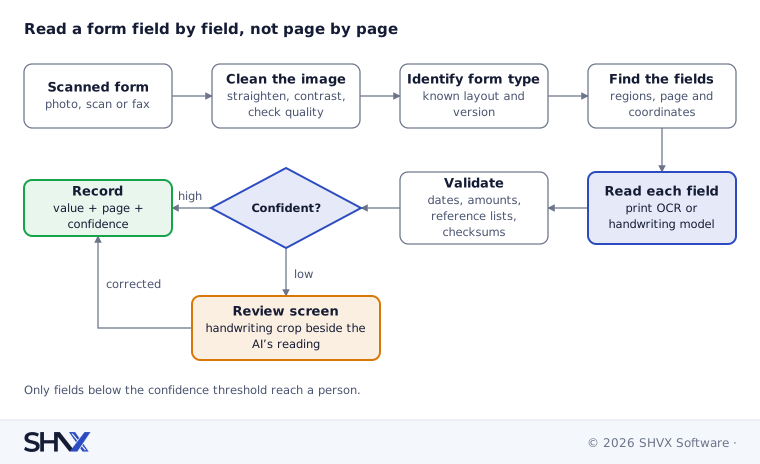
The short answer: treat a handwritten form as a set of small boxes, not one page of text. Find each field on the page, read it with a model suited to handwriting, check the value against rules (a date must be a date, a postcode must exist), and give it a confidence score. Confident fields go straight through. Unsure fields go to a reviewer who sees the original handwriting next to the AI’s reading.
Paper has not gone away. Application forms, delivery notes, inspection sheets, claim forms and patient intake sheets still arrive filled in by hand, then scanned or photographed on a phone. Our post How to Extract Data from Large, Complex Documents with AI covers the general pipeline. This post covers the hard part it leaves out: handwriting. It sits in our Agent-Ready Data work, where we turn messy documents into data that AI agents can trust.
Why is handwriting harder than printed text?
- Every writer is different. A printed “7” always looks the same. A handwritten 7 can look like a 1, and a 5 like an S.
- Writing ignores the boxes. People write over lines, squeeze text into margins and cross things out.
- Forms mix many kinds of marks. One page can hold printed labels, handwriting, ticked boxes, a signature and a rubber stamp.
- Scans are often poor. Phone photos come skewed, shadowed or blurred. Faxed copies lose detail.
- More than one script. A form may have printed English labels and answers written in Hindi, Marathi or Arabic, sometimes in the same field.
General-purpose OCR (optical character recognition, software that reads text from images) is built for print. Handwriting needs models trained on it, often called ICR (intelligent character recognition), or modern vision-language models that read an image and answer questions about it.
The pipeline, field by field
1. Clean the image. Straighten the page, fix the contrast, remove shadows and check the resolution. Flag pages too poor to read so a person can request a new copy early, not after a failed extraction.
2. Identify the form. Most businesses have a handful of form types and versions. Recognise which one this is, because a known layout tells you where every field should be.
3. Find the fields. For a known form, map each field to a region on the page. For unknown or free-form pages, use a layout model to find label and answer pairs. Keep the page number and the coordinates of every field: the reviewer will need them.
4. Read each field with the right tool. Printed text goes to standard OCR. Handwriting goes to a handwriting-capable model, field by field, with the field’s expected type in the prompt (“this is a date of birth”). Small cropped regions are read more accurately than whole pages.
5. Handle the special marks. Checkboxes and signatures need their own treatment, covered below.
6. Validate. Run plain rules on each value: dates are real dates, amounts are numbers, postcodes and city names exist in a reference list, an ID number passes its checksum where one exists.
7. Score and route. Combine the model’s own confidence with the rule results into one score per field. Fields above the threshold go through. The rest go to review.
Checkboxes, signatures and stamps
Checkboxes. Don’t ask a model to “read” a tick. Measure how much of the box is filled in, compare it with an empty box from the same form, and treat the result as yes, no or unclear. Crossed-out ticks and ticks between two boxes are common, so “unclear” must be an allowed answer that goes to review.
Signatures. For most forms, the question is whether a signature is present in the right place, not who signed. Detect presence and position. Signature verification (matching against a known sample) is a separate, specialised check with its own legal rules; don’t promise it unless you have built and tested it.
Stamps and seals. Detect them, crop them, and read any printed text inside (a company name or date). Stamps often overlap handwriting, so mark those fields for extra care.
Mixed scripts and languages
Detect the script of each field before reading it, rather than assuming the whole page is one language. Then:
- Use models that support the scripts you receive, and test each script separately; accuracy in one says nothing about another.
- Keep the original and a transliteration. A name written in Devanagari should be stored as written and in Latin letters, so it can be matched against other systems.
- Watch numerals. Some scripts have their own digits. Convert them to standard digits after reading and validate the result.
For high-volume, low-cost reading of simple fields, small language models running on your own servers can do a lot of this work. Our guide to commercial vs open-source LLMs explains when running your own models makes sense.
Human review that actually saves time
The review screen decides whether the system saves effort or just moves it. A good one:
- shows the cropped handwriting next to the AI’s reading, so the reviewer never hunts through the page;
- highlights only the unsure fields, not the whole form;
- lets the reviewer accept, correct or mark unreadable with one key press;
- records every correction as a new test case for the next model or rule change.
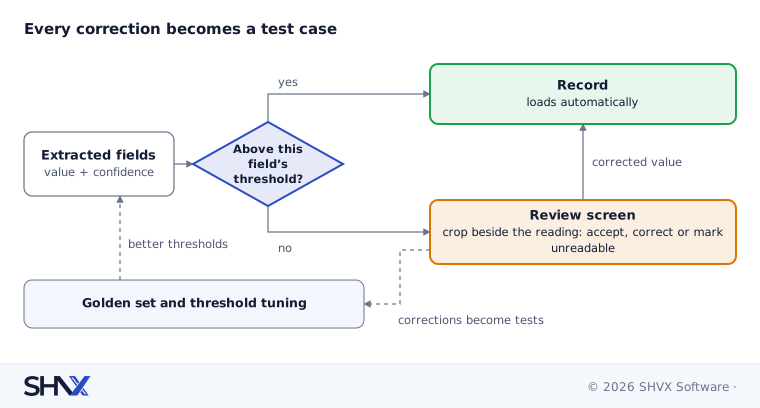
Set the confidence threshold per field, not per form. A wrong surname is annoying. A wrong bank account number is expensive. Critical fields can always go to review, while low-risk fields pass at a lower bar.
How to measure accuracy per field
Build a golden set: 30 to 50 real forms per form type, including your worst scans, where a person has written down the correct value for every field. Then track, for each field:
| Measure | Plain meaning |
|---|---|
| Field accuracy | Share of values exactly right |
| Character error rate | How many characters were wrong, for long text fields |
| Missed fields | Values present on the form but not extracted |
| Invented values | Values extracted where the form was blank |
| Review rate | Share of fields sent to a person |
| Correct auto-pass rate | Share of auto-passed fields that were in fact right |
The last two matter most to the business. A system that sends everything to review is safe but useless. A system that passes everything is fast but dangerous. Tune the thresholds until the auto-pass fields are reliably right, then work to bring the review rate down.
Common mistakes
- Running page-level OCR and hoping the fields line up.
- Treating a blank field and an unreadable field as the same thing.
- One confidence threshold for every field.
- Testing on clean samples instead of your worst real scans.
- Throwing away reviewer corrections instead of learning from them.
How SHVX can help
Still retyping handwritten forms? Send us five of your worst ones. We’ll run them through this pipeline and show you field-level accuracy before you commit to anything.
See the same approach applied to insurance documents.
Learn more about Agent-Ready Data.
FAQ
Can AI read handwriting accurately?
Often yes for clear writing in supported scripts, less so for poor scans and rushed writing. Measure it on your own forms and route unsure fields to people.
What is the difference between OCR and ICR?
OCR reads printed text. ICR is OCR trained for handwriting. Modern vision-language models can also read handwriting directly.
Can it verify signatures?
It can check that a signature is present in the right place. Verifying who signed is a separate, specialised check.
How many forms do we need to test with?
Start with 30 to 50 real forms per form type, including the worst scans you receive.